阅读时间: 2 分钟|
文章字数: 311 字
1 出事情了!
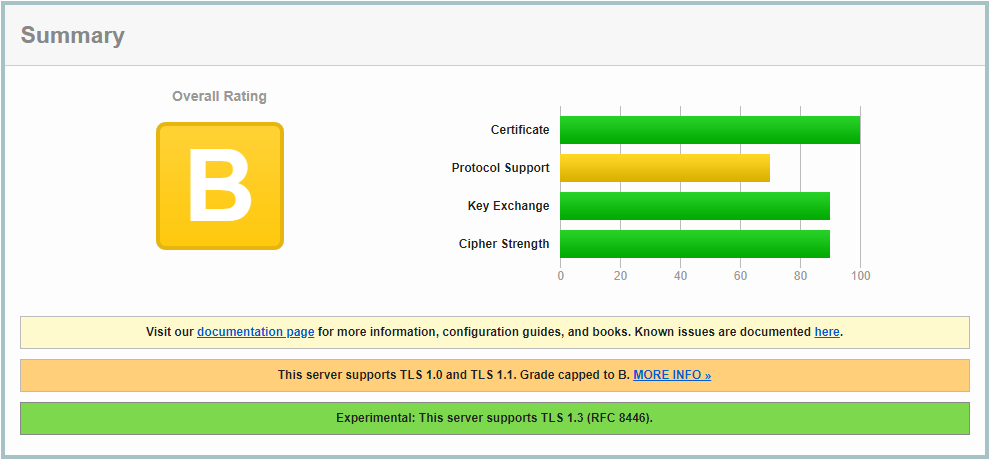
最近利用 Qualys SSL Labs 提供的 SSL Server Test 服务重新验证了一下网站的 SSL 强度,惊觉网站的 SSL 强度评价等级已经由此前的 A 调降为 B,调降的原因是:
- This server supports TLS 1.0 and TLS 1.1. Grade capped to B.
2 禁用 TLS 1.0 及 TLS 1.1
根据反馈信息,我开始着手解决这个问题。
2.1 网站环境
首先,介绍一下网站的环境:
- Ubuntu 18.04
- Apache2/2.4.41
- SSL 证书由 Let’s Encrypt 生成
2.2 禁用 TLS 1.0 及 TLS 1.1 的步骤
(1)通过 WinSCP 连接 VPS,在路径 /etc/letsencrypt 下打开文件“options-ssl-apache.conf”,找到以下语句:
SSLProtocol all -SSLv2 -SSLv3(2)将“SSLProtocol”的参数修改为:
SSLProtocol +TLSv1.2 +TLSv1.3(3)保存。重启一下 apache2 服务。
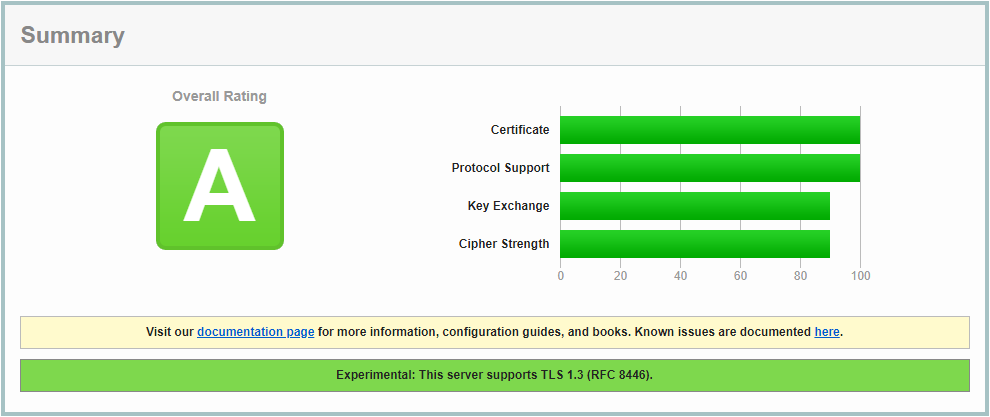
sudo systemctl restart apache2.service(4)重测一下 SSL 的强度,大功告成:
2.3 为什么要修改“options-ssl-apache.conf”?
参考:Disabling TLS 1.0 in Apache 2.4
In a large amount of cases for this “bug” it turns out that if you have letsencrypt installed on your server, it’s configuration file sets protocols which are superseding ssl.conf or vhosts’ settings:
/etc/letsencrypt/options-ssl-apache.conf3 附:网站启用 TLS 1.3 的教程
TLS 1.3 是传输层安全性(TLS)协议的最新版本,只要 Apache2 的版本不低于 2.4.37 即可自动启用。运行以下代码更新 Apache2 至最新版本即可:
sudo apt-add-repository ppa:ondrej/apache2
sudo apt-get update
sudo apt-get dist-upgrade
《提升网站的SSL强度:由B到A的距离》有1条评论